 SHADOW
01
Download Scripts / Download Scripts (JSON)
Export your entire NinjaOne script library as either PowerShell packages or raw JSON archives with SHA-validated payloads for compliance, cold storage, or tenant migrations.
Back up, compare, report on and manage your NinjaOne scripts, policies, custom fields and more, directly from the interface you already use.
 SHADOW / FOR NINJAONE
SHADOW adds a menu and full-screen tools to the pages you already use. Every screen follows the same dark layout.
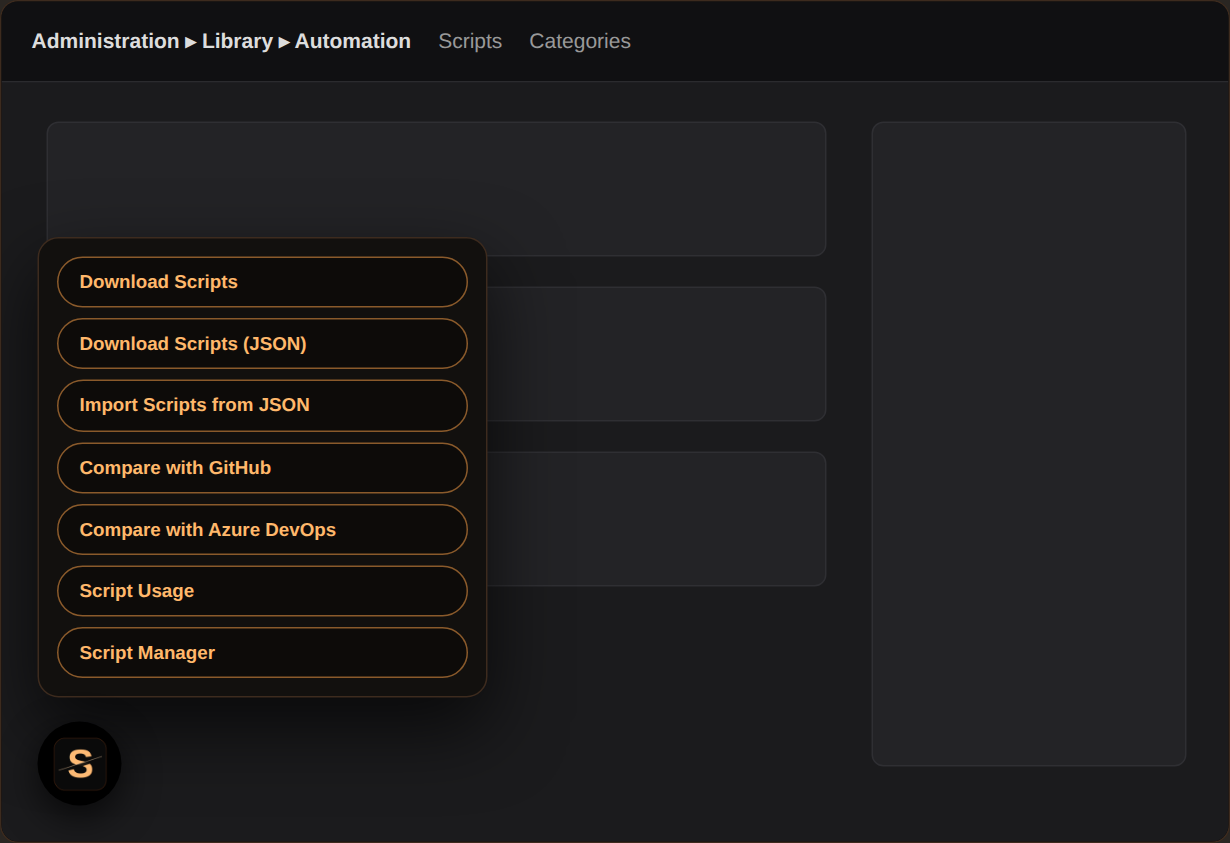
A floating SHADOW button opens a menu with every action available on the current NinjaOne page. Only the tools that fit the page you are on show up.
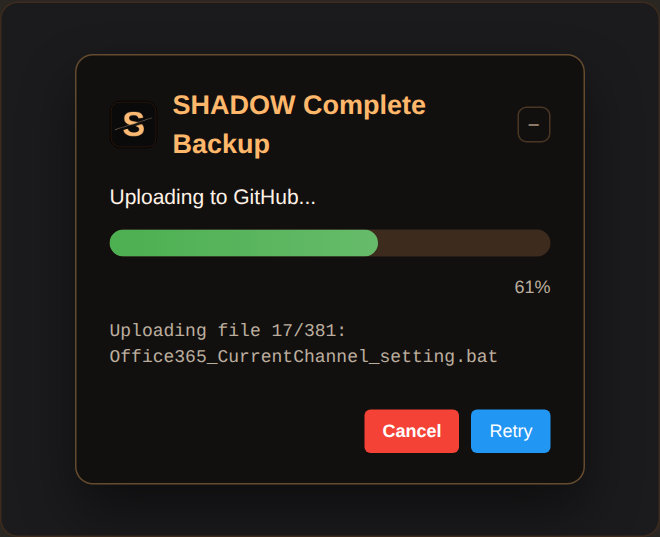
Back up scripts, policies, custom fields and the technician permissions audit to GitHub, Azure DevOps or Bitbucket. Minimize the card to a small pill while it runs, or cancel at any time.
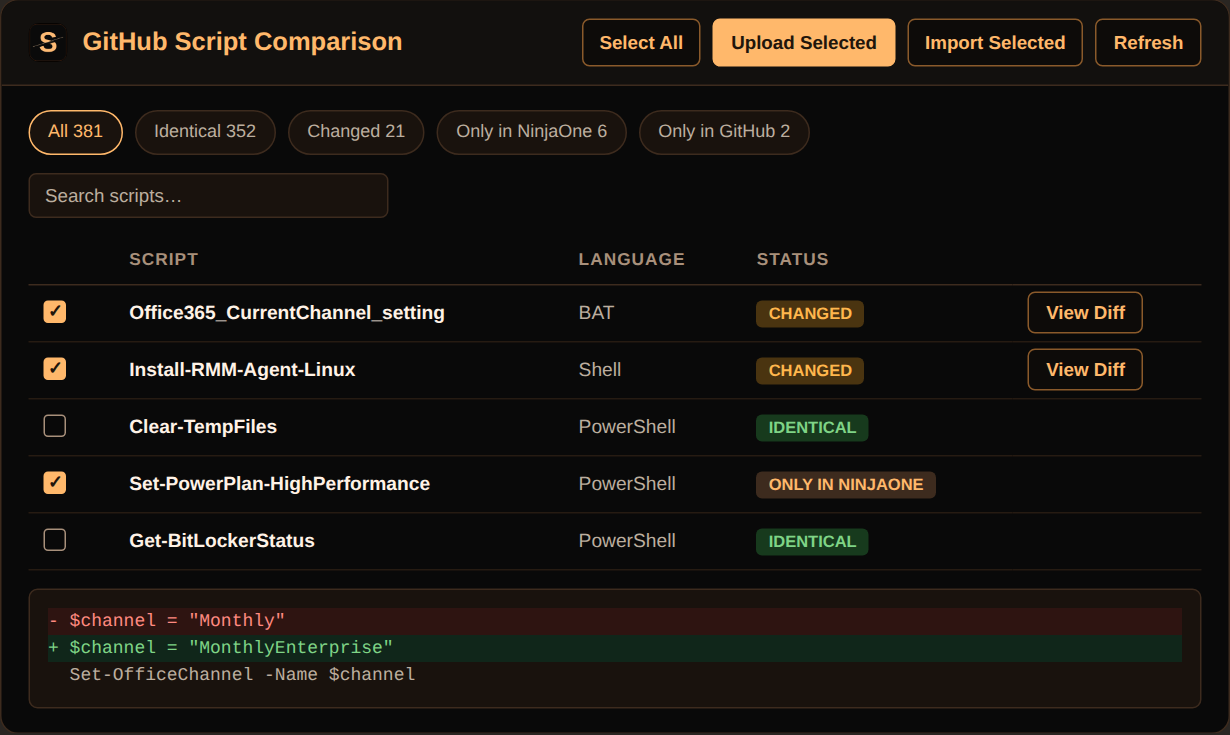
Load the full library, filter by status, preview inline diffs and upload only what you select. Apply changes from the repository back into NinjaOne for GitHub and Azure DevOps.
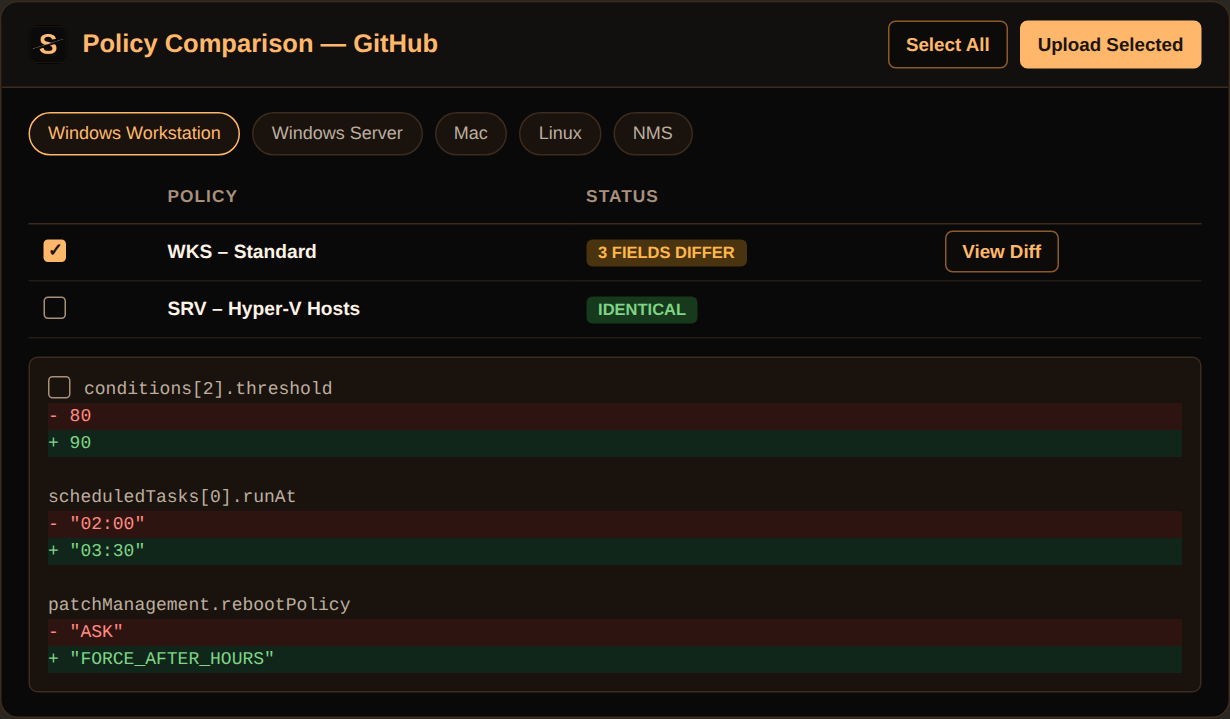
See exactly which policy fields differ from the version in your repository, path by path, and push the selected policies as a backup.
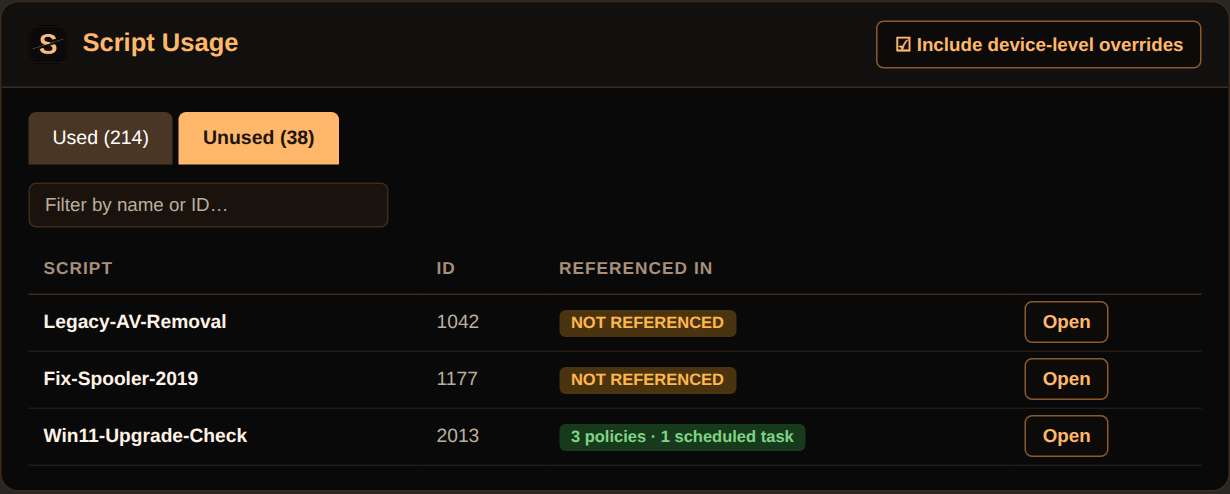
See where each script runs across policies, scheduled tasks and system tray, and spot scripts that are not referenced anywhere.
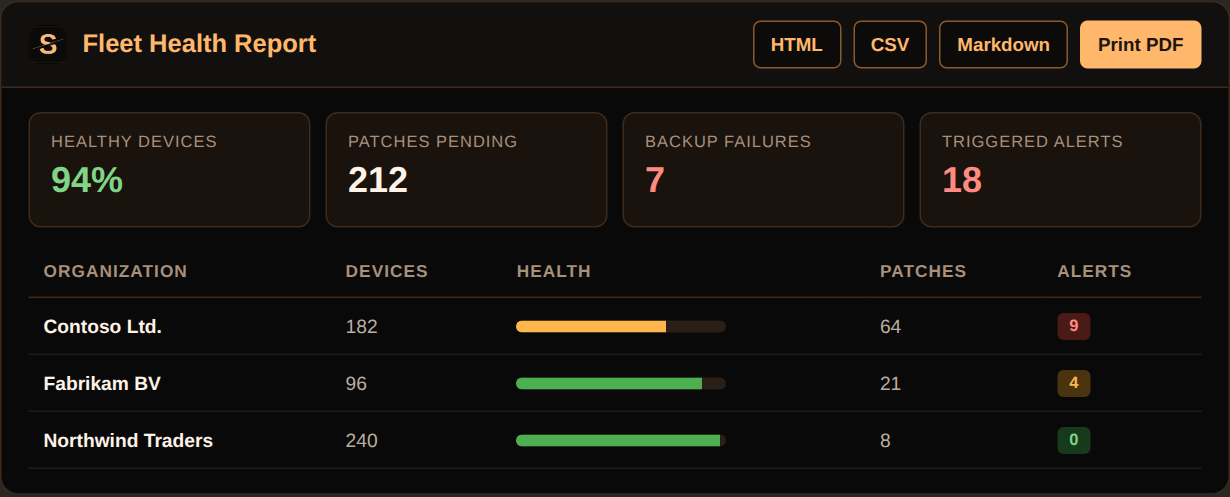
Fleet Health, Asset, Activities, Automation Usage, Policy and Technician Permissions reports. Export to HTML, CSV, Markdown or PDF.
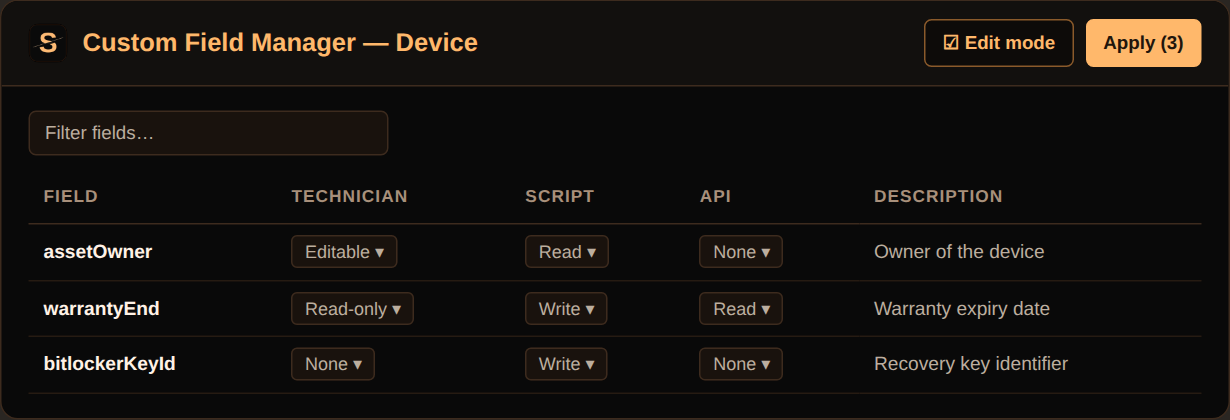
Review and bulk-edit permissions, descriptions and tooltips, set organization values in bulk, and trace which scripts read or write each field.
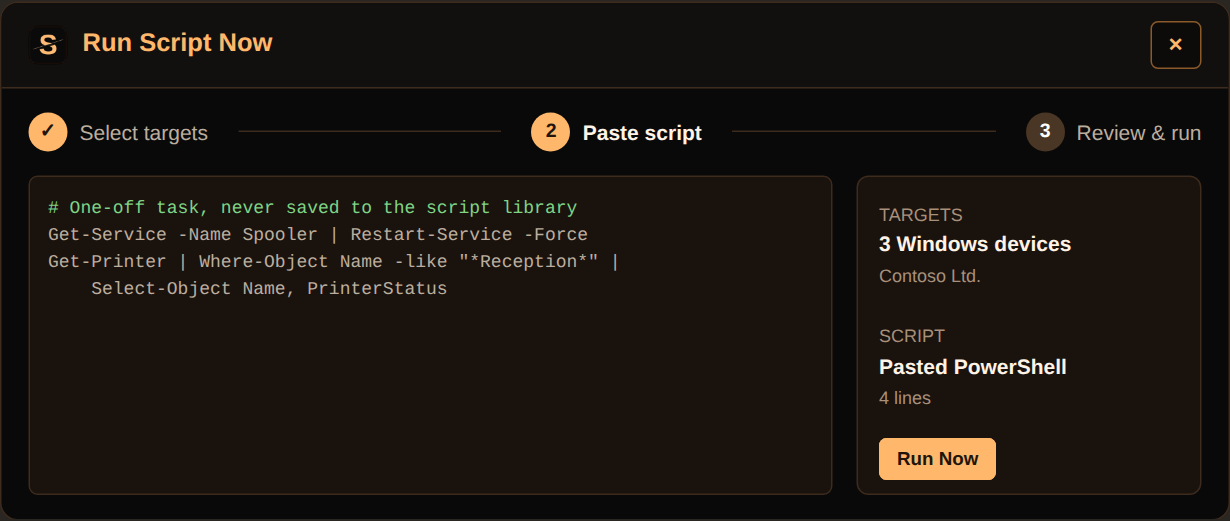
A short wizard picks the devices and runs a pasted PowerShell script. Nothing is stored in your script library.
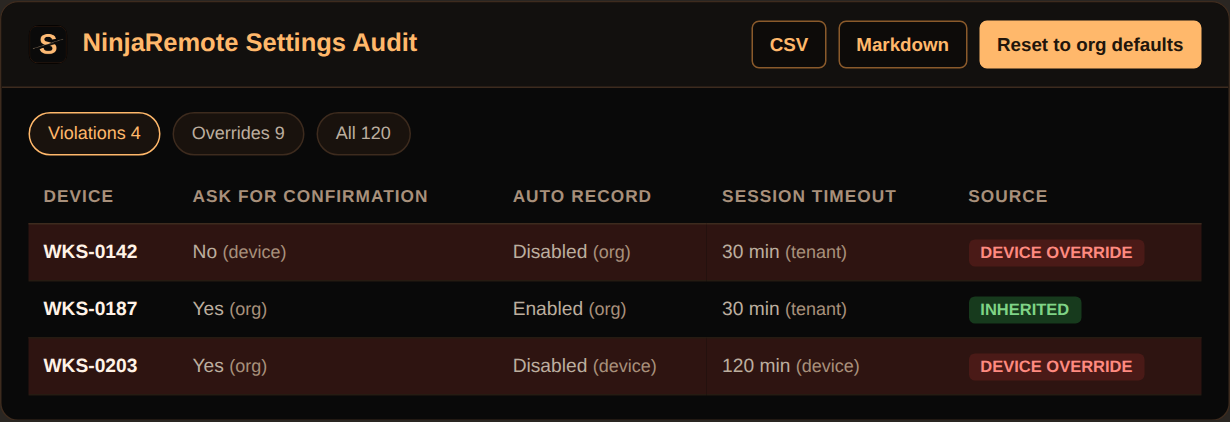
Check effective remote-session settings per device against your own rules and see whether each value comes from the device, organization or tenant.
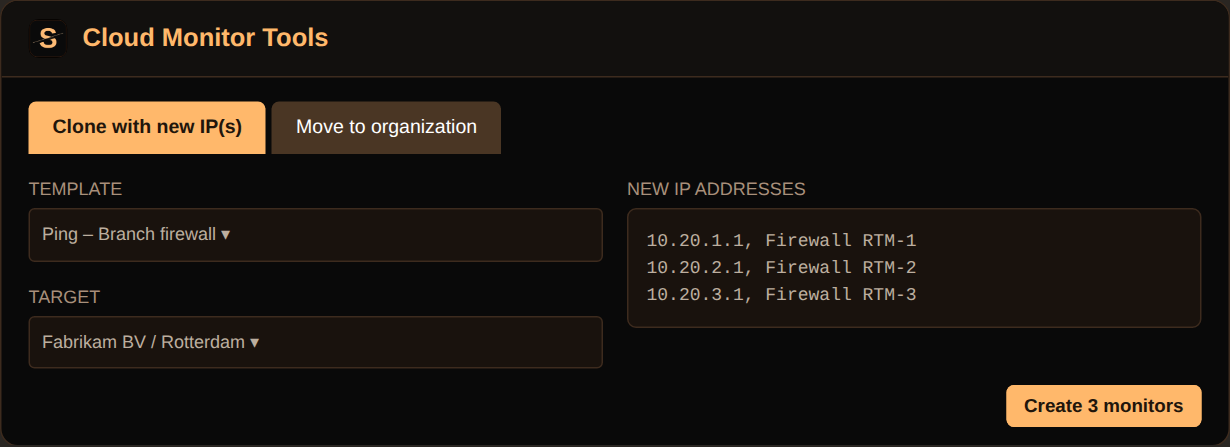
Clone a monitor for a list of new IP addresses, or move several monitors to another organization in one request.
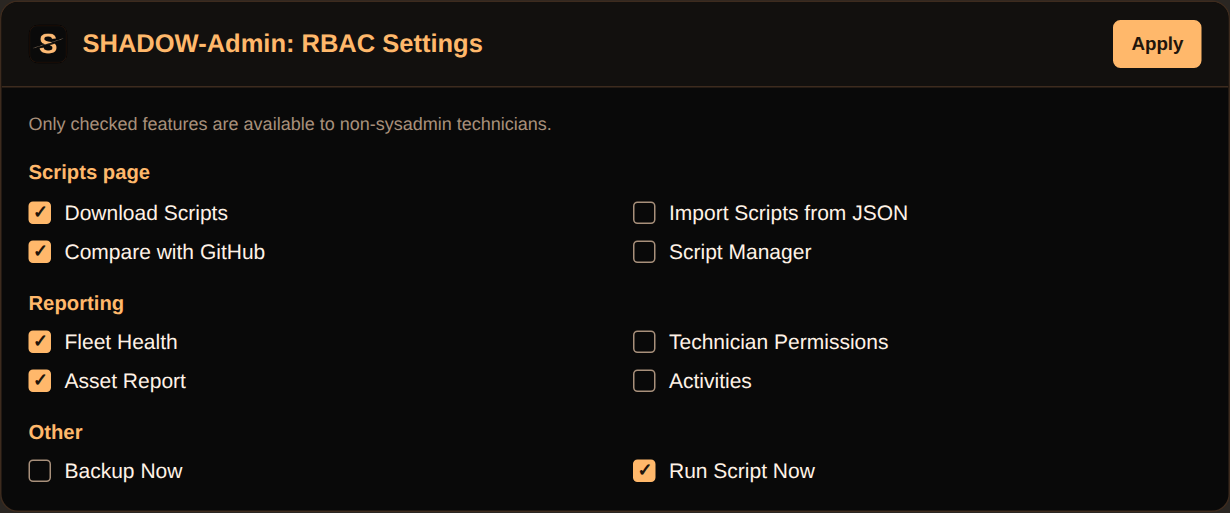
Sysadmins choose which SHADOW features technicians can use. Everything not on the allowlist stays sysadmin-only.
Previews marked "Sample data" are illustrations made with fictional organizations, devices and scripts. They show the layout of each tool, not real customer data.
Short descriptions of every feature. The README has the full details.
Export your entire NinjaOne script library as either PowerShell packages or raw JSON archives with SHA-validated payloads for compliance, cold storage, or tenant migrations.
Queue any number of SHADOW exports for re-import, preserve valid source category mappings when present, and only assign the SHADOW category when category data is missing, while skipping unsupported languages and respecting backup guardrails.
Launch a full-screen diff overlay that progressively loads your entire library (no file-count cap), highlights status buckets, filters results, previews inline diffs, and queues uploads per detected language/extension.
The same full-screen diff overlay, filters, and per-script upload queue as Compare with GitHub — including applying selected changes back into NinjaOne — but against the Azure DevOps repository configured on the popup's Azure DevOps tab…
Browse the connected repository directly inside NinjaOne, multi-select PS1/SH/BAT/JS/VBS/CMD/JSON assets, choose a destination category (or preserve source categories), and import them in bulk with progress feedback and auto-refresh.
Open a single overlay that combines the former Used Scripts and Unused Scripts views, revealing where each script runs across policies, scheduled tasks, and system tray configurations…
Open one overlay that lists every script (metadata only — no script body is decoded) for fast, library-wide organization, with two tabs.
Analyse your environment against the official NinjaOne Template Library, review the remediation list, and optionally apply or skip updates with confirmation prompts.
Keep individual NinjaOne scripts aligned with a third-party GitHub source by storing a raw URL in the script's description (ShadowGitSync:<url>).
Browse your token-authenticated private repository from the Template Library page, multi-select scripts, choose a destination category (or preserve the source categories), and import them in bulk with progress feedback.
Paste a raw PowerShell script and run it once on selected devices, without saving it to the script library first — no need to build a permanent script for a one-off task.
Back up device-level metadata or restore field definitions from JSON exports, with per-file validation and backup enforcement.
Move customer-specific metadata between tenants and ensure the definitions stay consistent across environments.
Keep branch/location data aligned by exporting and re-importing standardized definitions with a single click.
Open one filterable table of every custom field for the selected scope and review each field's Technician, Script, and API permission.
From the Reporting page, open Custom Field Usage to scan every NinjaOne script's code for custom-field reads and writes…
Set organization custom field values across all or selected organizations at once, two ways: (1) enter a value manually with a type-aware input for text, checkbox, numeric, date, single-select Dropdown, and Multi-select fields…
Open the NinjaRemote Settings Audit overlay from Device Search, pick organizations (searchable, defaults to all), then choose which NinjaOne Remote settings to audit…
Run a full backup from the System Dashboard that collects scripts, policies, and custom fields (each individually toggleable in the popup's GitHub tab), applies automatic path sanitisation, honours the “force local backup” setting…
When Auto backup is enabled, SHADOW checks backup age at extension startup and automatically runs a full backup once it exceeds the configurable max-age threshold, keeping backups fresh without manual effort or redundant runs.
Apply a monitoring policy to a selected device role across every organisation at once via an overlay that supports progressive loading, select-all toggles, and real-time success/error reporting.
From the Administration ▸ Policies page (Agent/NMS/VM/MDM tabs), export every policy as a JSON ZIP grouped by device class — the same backup captured by Backup Now, available as a standalone, on-demand download.
From the Administration ▸ Policies page, open a structural (path-by-path, not text) diff between each live NinjaOne policy and its GitHub-backed-up copy, with a View Diff per changed policy showing exactly which fields differ…
The same structural diff, per-field View Diff, filters, and progress bar as Compare Policies with GitHub, against the Azure DevOps repository instead.
Generate structured policy documentation from the Reporting page with selectable sections, PDF-friendly output, and optional raw JSON companion exports.
Launch the Overrides audit from the Reporting page to identify inherited vs overridden values across a policy tree and its devices.
Open a dedicated asset lifecycle view from the Reporting page that analyzes managed workstation/server inventory by warranty-age buckets, surfaces insights (e.g., old/unknown devices), and provides exportable report output…
A tenant-wide and per-organization health scorecard from the Reporting page, built from the same aggregate data behind NinjaOne's own System Dashboard: device health, patch and vulnerability status, backup failures, triggered alerts…
From the Reporting page, see which automations (policy-condition-triggered actions and manually/scheduled-run scripts) ran over a date range, how many times each ran, and success vs. failure counts…
From the Reporting page, audit every technician role's full permission set as a searchable role × permission matrix, save a snapshot to GitHub…
From the Reporting page, pull the tenant activity log for a minute-precision date/time range and filter by activity type…
Track when backups were completed, view the daily status, and require a same-day backup before any script or field import can proceed.
Open an overlay with curated ITAM parent/child templates grouped by technology stack, preview icon matches from your existing tenant, and queue role creation with automatic batching, countdown pauses, and resume prompts that avoid MFA lockouts.
Load JSON template files generated by SHADOW to reproduce complex ITAM role structures in new tenants while reusing stored custom fields and hierarchy metadata.
Capture your current unmanaged-role definitions as JSON for audit trails, change reviews, or peer sharing.
Pick a template — either an existing Cloud Monitor (its type, frequency, timeout, and alert conditions are cloned as-is) or Build new…
Select one or more existing Cloud Monitors and move them to a different organization/location in a single bulk request.
A button visible only to sysadmin technicians, on Administration ▸ Users ▸ Security Settings.
Your choices are saved as a JSON payload in the value of a single, auto-created, tenant-wide GLOBAL-scope custom field (one value for the whole tenant, not per-device/org/location).
Every gated SHADOW button/overlay checks the current technician's NinjaOne sysadmin flag live before rendering; features not on the allowlist are hidden entirely for non-sysadmins (not just disabled)…
If the configuration was never saved, or can't be read at all (network error), features fail open (nothing restricted) so the extension never silently breaks for the whole team before it's configured.
Connect GitHub, Azure DevOps or Bitbucket Cloud. Each backup goes to exactly one destination, chosen in the popup.
✓ Backup ✓ Compare ✓ Apply back to NinjaOne ✓ Private import
✓ Backup ✓ Compare ✓ Apply back to NinjaOne
✓ Backup – Compare not available yet
Every tool shows up on the NinjaOne page where it makes sense.
| NinjaOne area | Added by SHADOW |
|---|---|
| System Dashboard ▸ Overview | Backup Now |
| Administration ▸ Library ▸ Template Library (Scripting & Automation) | Compare Templates, Import from Public GitHub, Import from Private GitHub |
| Administration ▸ Library ▸ Automation | Download Scripts, Download Scripts (JSON), Import Scripts from JSON, Compare with GitHub, Compare with Azure DevOps, Script Usage, Script Manager |
| Administration ▸ Devices ▸ Device Custom Fields | Export, Import, Custom Field Manager |
| Administration ▸ Customers ▸ Organization Custom Fields | Export, Import, Custom Field Manager, Bulk Set Values |
| Administration ▸ Customers ▸ Location Custom Fields | Export, Import, Custom Field Manager |
| Administration ▸ Customers ▸ Organizations | Bulk Policy Assignment, Cloud Monitor Tools |
| Administration ▸ Policies (Agent/NMS/VM/MDM tabs) | Download Policies (JSON), Compare Policies with GitHub, Compare Policies with Azure DevOps |
| Administration ▸ Users ▸ Security Settings | SHADOW-Admin: RBAC Settings (sysadmin only) |
| Reporting | SHADOW Policy Report, Overrides, Asset Report, Fleet Health, Automation Usage, Custom Field Usage, Technician Permissions, Activities |
| Device Search | NinjaRemote Settings Audit, Run Script Now |
| Device Dashboard (individual device page) | Run Script Now |
| Administration ▸ Devices ▸ Roles (Unmanaged) | Add Unmanaged Devices, Import Unmanaged Devices, Export Unmanaged Devices |
The latest three versions at a glance.
Add SHADOW from the Microsoft Edge Add-ons store or the Chrome Web Store and open NinjaOne.
Create a token for GitHub, Azure DevOps or Bitbucket and enter it in the SHADOW popup. Use Test Connection to check it.
Choose the backup destination, what a backup includes and which buttons are visible.
Open the SHADOW button in NinjaOne and run backups, comparisons, reports and bulk actions.
SHADOW talks to NinjaOne's own web endpoints and to the repository you choose. Nothing is sent anywhere else.
Read the privacy policy ↗The S with a katana slash on near-black, in SHADOW orange. The same logo, palette and black-and-orange buttons are used in the extension and on this site.
Keep the rounded corners, do not recolor the mark and leave clear space around it. SHADOW is independent and not affiliated with NinjaOne, Inc.
Install the extension from Microsoft Edge Add-ons or the Chrome Web Store, inspect the project on GitHub, or ask a question on Discord.
Independent project. Not affiliated with, endorsed by or sponsored by NinjaOne, Inc. SHADOW uses NinjaOne's internal web endpoints, which can change without notice.
SHADOW began as a PowerShell script by David Spzunar.
